
5 AI marketing jobs for garden centers, from the plant bench to the next visit
Spring is on the campaign calendar. The plants for the display haven’t arrived, the photograph shows last year’s bench and the workshop is ready to book. Those three messages need different decisions.
AI marketing for garden centers could help keep them connected to what’s happening at the nursery. An agent might collect current stock information, staff observations and approved plant guidance, then prepare the website, email and event messages for review. Your staff supply the advice and confirm what’s ready to promote.
The five jobs below are proposed uses requiring suitable tools, instructions and access. All nursery, customer and event examples are fictional. They aren’t tested BoastOS features, measured customer results or recommendations about particular plants.
1. Build a seasonal calendar that can change
The spring email has a planned date, but the display, photograph and workshop may be ready at different times. The campaign calendar needs to preserve those differences.
Have the agent collect the buyer’s arrival update, the staff review of relevant conditions and the marketer’s photo check. In our example, its note could identify three separate tasks:
Display announcement: waiting for the buyer’s arrival confirmation. Workshop invitation: ready for the event owner’s review. Email photograph: replace after the display is assembled.
The workshop can proceed through review even while the display announcement waits for the plants. Give each message its own current status.
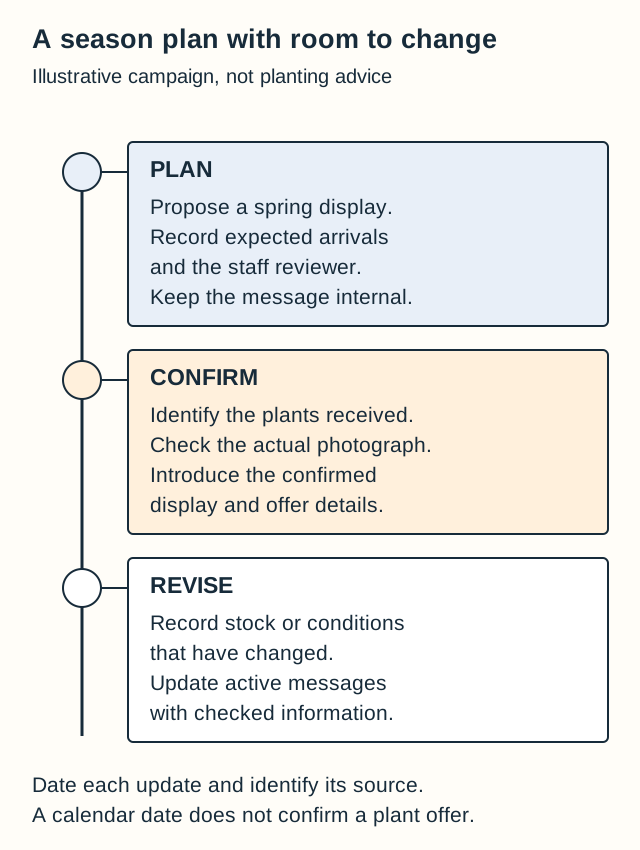
| Campaign stage | What to establish | Message to prepare |
|---|---|---|
| Display proposed. | Planned arrival and a named staff reviewer. | Keep the campaign internal until the offer is confirmed. |
| Plants arrived. | Exact items, current stock and an actual display photograph. | Introduce the confirmed display and link to its details. |
| Stock or conditions changed. | Current availability and updated staff advice. | Revise active messages and explain changed offers or events. |
The USDA’s Plant Hardiness Zone Map instructions explain that zones reflect average annual extreme minimum winter temperatures and guide perennial hardiness. Soil, moisture, exposure and other conditions also matter. A zone supplies neither a campaign date nor a promise that a plant will succeed in a customer’s garden.
Choose garden center marketing ideas according to expected stock, staff observations and what you can accurately photograph. Assign someone to check the scheduled message before release.
2. Turn a plant-bench question into a reviewed guide
“What can I put on a shady patio?”
Ask your knowledgeable staff which plants they’d discuss and what they’d need to know about the site. The agent could bring their selected labels and recurring customer questions together for a guide draft, with the source for each plant detail.
For the patio question, the guide might explain what information to bring about the location, observed light and container or space. Staff decide which details matter. Use the selected plants’ exact identities and checked information in the guide.
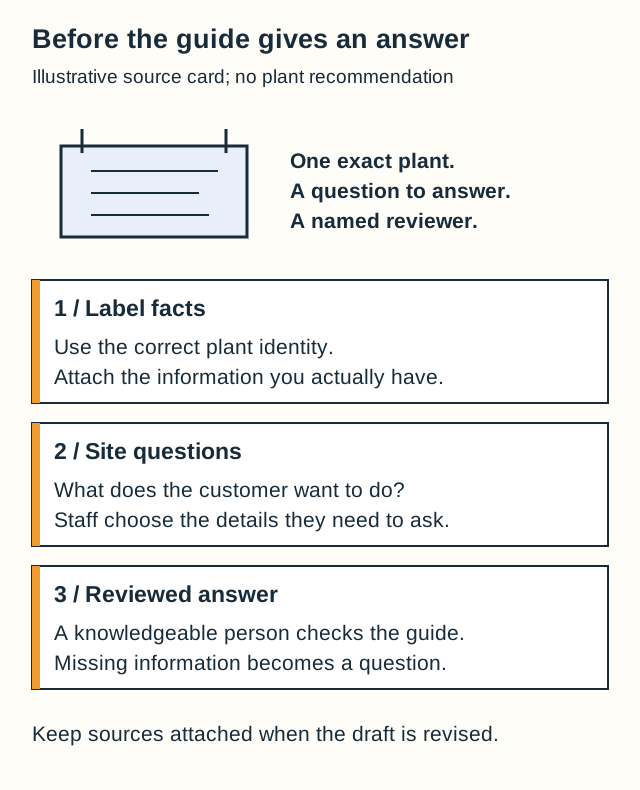
During review, compare plant names with the labels. A broad name may have replaced the exact variety. Missing site information should also return as a question for the customer before advice is prepared.
Use your own photographs with the checked guide and link it from the relevant plant or event page. Choose this job when useful bench explanations rarely reach the website; staff can point shoppers to the same information afterward.
3. Connect a promotion to what is actually on the bench
Three plants appear in this fictional container-display photograph. The offer includes two of them. The campaign needs to explain the difference.
Give the agent the current item records and approved offer. Ask for the website feature and email, naming the included items and identifying anything shown only as part of the display. A draft claiming everything pictured is included needs correcting.
Garden center marketing automation could connect a stock change with the next content task. When a featured item sells out, notify the campaign owner to revise the page and active messages. Have knowledgeable staff confirm any proposed replacement before recommending it.
Review the actual photograph beside the invitation, then keep both current after the first email goes out.
4. Give a workshop useful communication before and after
Our fictional instructor confirms that participants will assemble a container at the nursery and receive the listed materials. The event owner supplies the booking details. Those facts make a clear invitation:
Build a container with our instructor, using the materials listed on the workshop page. See the session details and book your place.
An agent could prepare the booking page, invitation and reminder from that event record. Have the workshop owner check them together. If plans change, update the record and affected messages; correcting only the website would leave the old invitation circulating.
After the event, the agent could format the instructor’s reviewed notes for participants who agreed to receive them. Use actual demonstration photographs and the explanations the instructor selected. Check a transcript before turning a casual remark into written guidance.
Try this garden center marketing job if organizing workshop messages keeps taking time away from the session. The invitation describes what participants will do; the follow-up gives them the instructor’s checked material to revisit.
5. Make the return-visit message answer a real question
A customer asks to hear when a particular plant arrives and agrees to the notification. Record that exact request and contact preference with the inquiry.
After staff confirm the arrival, an agent could draft the notice:
The plant you asked us to contact you about has arrived. Please get in touch for its current availability and visit details.
Add the confirmed plant name and appropriate inquiry route. Arrival isn’t a reservation or a promise of continuing availability. Keep general promotions separate from this requested notification and check preferences before further outreach.
Start with a confirmed display or workshop
Gather the current records, a real photograph and the staff member who can answer questions about one upcoming display or workshop. You can ask an agent for connected messages and see which details still need resolving.
Bring the example to a BoastOS BoastAble services conversation about sharing the nursery’s knowledge through useful customer communication.
Prepared with AI assistance for BoastOS. These are proposed workflows with fictional examples, not measured customer results or plant recommendations.